
For Riders who will continue to need rides with HopSkipDrive in the coming school year, you can duplicate existing Rides Series to efficiently set up rides for the next year. When you duplicate a Rider's existing Ride Series, the new series will automatically include the same Riders, Locations, and pickup or drop-off times.
How to duplicate a Ride Series for the coming school year
Follow the steps below to duplicate a Ride Series for the next school year:
- On the Rider's profile page, scroll down to the Rides section. Select Completed.
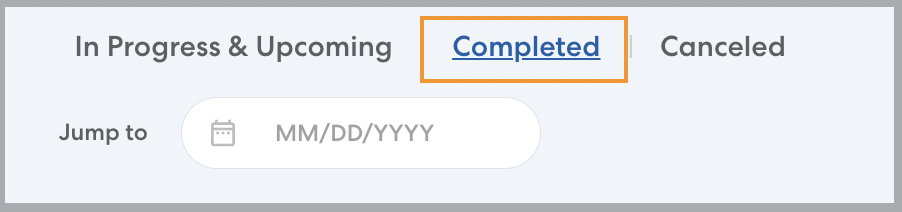
- Select any ride from the series you want to duplicate.
- Click Duplicate.

RideIQ will create a new Ride Series with the same Riders, locations, Calendar and pickup or drop-off time.
- Select the days of the week when rides should take place. Set a start date and end date for the new Ride Series. You can set up Ride Series at any time, but be sure to set the start date for the start of the school year or whenever the Rider will first need rides.
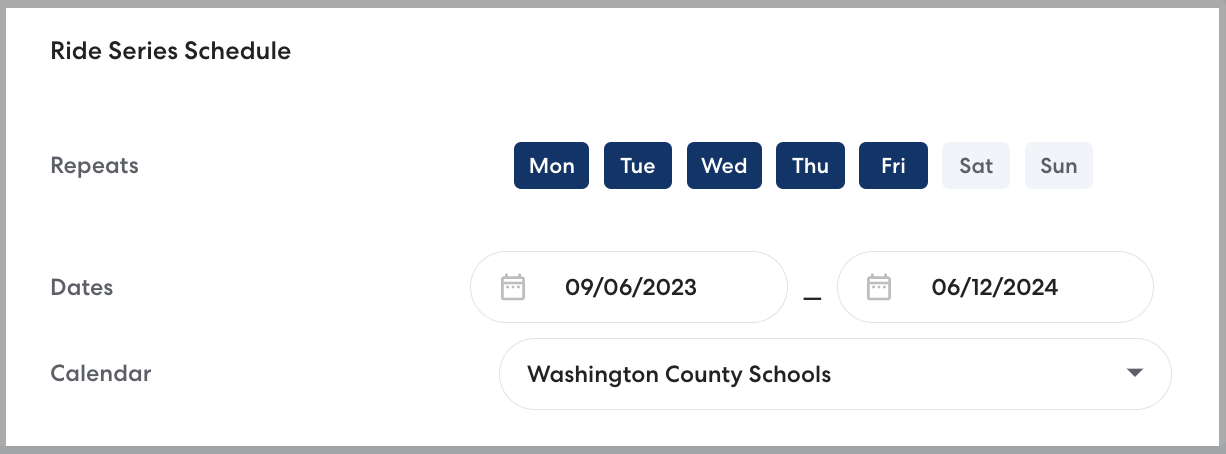
- Make any additional edits to the Riders, Locations, time, or Calendar for the Ride Series. Learn more about editing Ride Series here.
- Click Save. Repeat as needed for the Rider's return trip Ride Series and any series scheduled for late start or early release days.
Learn more
search terms: Extend ride series, continue ride series, use same series, continue rides