
In this article
| Ride Recording: Dashcam is available in select areas only. |
Ride Recording: Dashcam is an additional Rider Service you can add to a rider's profile for a per-ride fee. When you add Ride Recording: Dashcam to a ride, the ride will be performed by a CareDriver with an internal dashcam that will record audio and video while the rider is in the vehicle.
About Ride Recording: Dashcam rides
Ride Recording: Dashcam rides can only be claimed by CareDrivers equipped with a dashcam. Recording begins automatically as soon as a rider is in the vehicle, and includes both audio and video.
How to enable Ride Recording: Dashcam for a rider
Follow the instructions below to enable Ride Recording: Dashcam.
Prerequisites
In order to be able to enable Ride Recording: Dashcam rides for an individual rider, the service must be enabled at the account level. If the Ride Recording: Dashcam service is not available, contact your Account Manager for assistance.
Enabling Ride Recording: Dashcam for a rider
Rider Services are managed in the Safety Settings section of a rider's profile. To enable Ride Recording: Dashcam for a rider, follow the steps below:
- Navigate to the rider's profile page.
- In Safety Settings, click Edit.
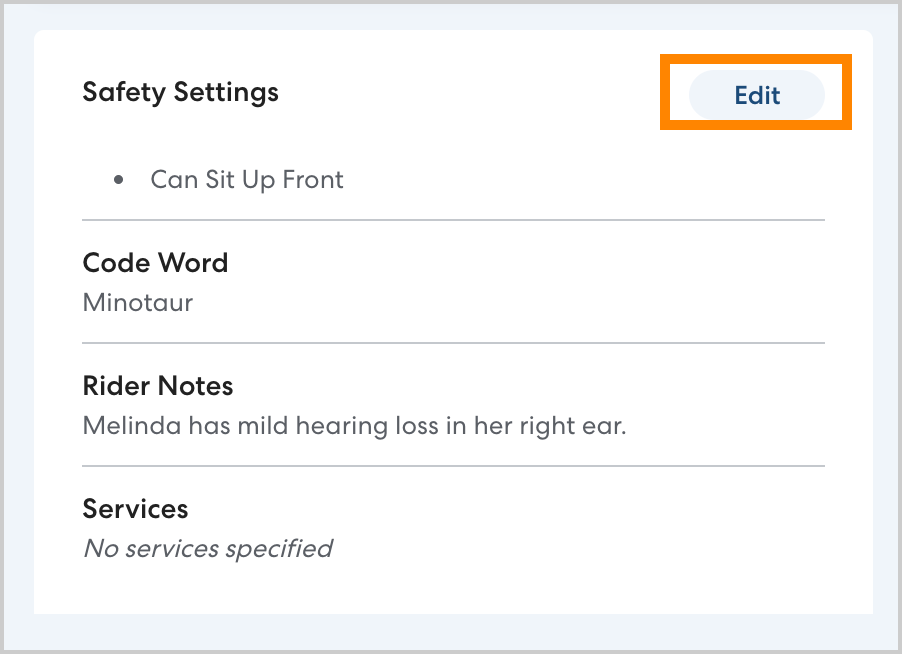
- Under Services, select Ride Recording: Dashcam, then click Save. All rides for the rider will include the Ride Recording: Dashcam service going forward. You'll see the corresponding service icon at the top of the rider's profile, in the Rides list, and on the rider's rides.
Scheduling Ride Recording: Dashcam rides
Once you have enabled Ride Recording: Dashcam for a rider, schedule the ride or series as usual, then click Save.
While the general six-hour scheduling window applies, the ride or series will have a status of Requested while HopSkipDrive's team reviews it. When the ride has been approved or denied, the Specialty Transportation team will notify you via email. Approved rides will then appear on the In progress & upcoming rides list. Learn more about ride requests here.
Ride Recording: Dashcam ride restrictions
Ride Recording: Dashcam cannot be combined with the WAV Rider Service.
You may add additional riders who do not have Ride Recording: Dashcam enabled to the ride, but you must consent to these riders being recorded.
Managing and tracking Ride Recording: Dashcam rides in RideIQ
Ride Recording: Dashcam rides are identified with a camera icon, as shown below:

Ride Recording: Dashcam rides can be edited and canceled as usual.
Caregiver communications
Caregivers will receive the same ride scheduling and status notifications as usual for all HopSkipDrive rides. Learn more about caregiver communications here.