
In order for a rider to receive schedule updates and information about the CareDriver who will be picking them up, the rider must have a phone number added to their profile. Adding a phone number is optional, but when appropriate it can help ensure efficient pickups. Learn how to add a rider phone number in this article.
All caregivers will receive text message updates as outlined here: What Information Do Caregivers Receive About HopSkipDrive?
Scheduling messages:
Riders can receive the following messages regarding their ride schedule:
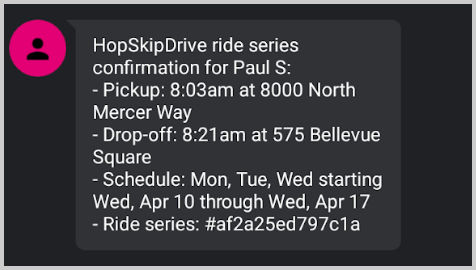
- A message with the date, time, and pickup and drop-off locations when a ride or series is scheduled.
- A message when a ride or series is edited, including any changes to dates, times, or pickup/drop-off locations.
- A message when a ride or series is canceled.
Ride messages:
Riders receive the following updates when a ride is in progress:
- Just before the ride, riders receive a text message with the phone number of a dedicated rider support line they can text or call with questions or concerns.
- 60-90 minutes before the ride, riders receive a dedicated link to the Track My Ride page, where they can view ride information and track it in real time. Learn more about the Track My Ride page in this article.
- As soon as the CareDriver has started the ride, riders receive a text message the CareDriver's name, picture, license plate, and vehicle description.
-
When the CareDriver arrives, the rider receives a message that includes the CareDriver's name and a reminder of the code word.
- Riders will also receive a message if the CareDriver is running late.