
|
In this article
In many cases, the most efficient route for a ride includes tolls. To ensure that riders are consistently transported via the quickest route, your organization can enable toll routes.
How enabling toll routes works
When you enable toll routes, CareDrivers are automatically routed via the most efficient path. As soon as the ride is complete, the CareDriver is reimbursed for the cost of any tolls they incur.
The cost of the toll is added to the fare your organization pays for the ride and will be included as a line item on your invoice.
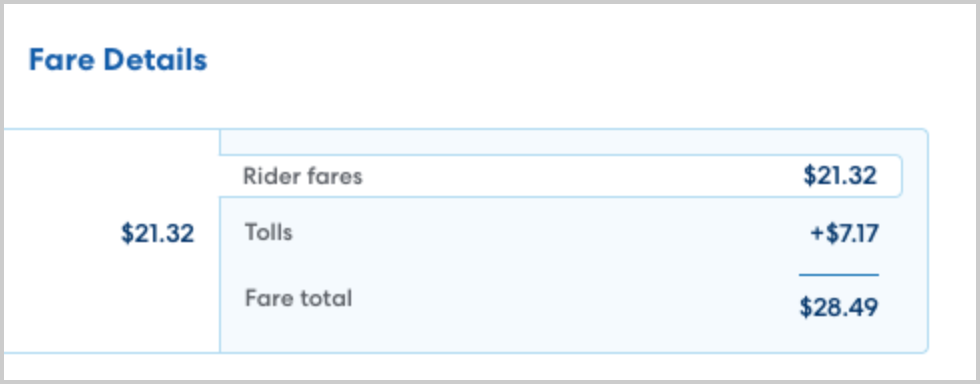
- You will be billed for the tag cost of any tolls. This is the lower cost, rather than pay-by-mail or similar options.
- HopSkipDrive will only bill you for the actual cost of any tolls incurred. If the CareDriver takes a different route or the tolls cost less than estimated this will be reflected in the amount you are billed.
- Express lanes are not eligible for toll reimbursement. You will not be billed for express lane tolls.
If you opt out of toll routes
If your organization chooses to opt out of automated toll reimbursement, CareDrivers will be routed via the most efficient route that does not include any tolls.
| Note: in some areas, opting out of toll routes may significantly increase ride cost due to much longer routes. This is particularly true in areas with toll bridges, as the non-toll route may require driving around a large body of water. We recommend reviewing your routes to confirm the best option for your organization. |
Managing toll settings
Automated toll reimbursement is set at the account level and will apply to all rides for your account.
| This feature is being released in selected pilot markets before becoming available more broadly. HopSkipDrive will contact clients in the selected markets who have at least one toll ride to confirm whether you would like to opt in or out of this feature. Please reach out to your account manager if you have additional questions. |