In this article:
When you apply to drive with HopSkipDrive, we ask you for copies of key documents, including your driver's license, proof of insurance, and vehicle registration. In some areas, additional documents may also be required.
It is important that we are able to clearly read all information on these documents in order to verify them. Follow the tips below for a smooth document upload:
General tips
- Make sure the name on any documents you upload matches the name you used to sign up with HopSkipDrive.
- The name on your proof of insurance must match the name on your driver's license.
- Check that the insurance document you upload includes the VIN, make and year of your vehicle, and expiration date of the policy.
Taking a picture with your phone
To upload paper documents, you can take a picture of the document with your smartphone.
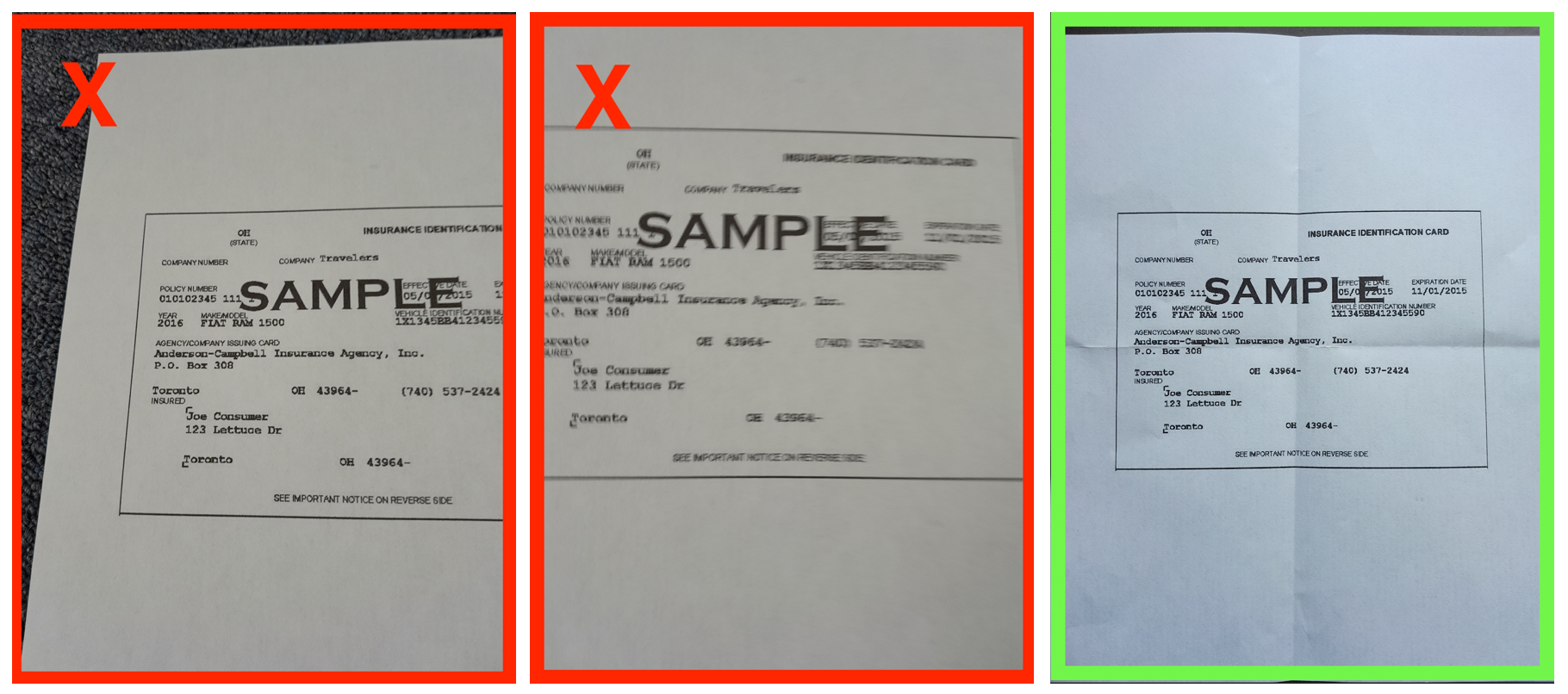
- Take a picture of the document on a flat surface in an area with good lighting.
- Make sure that all four corners of the document are visible in the photo. This helps ensure that we can see all the required information.
- Check that your camera is facing forward, not in selfie mode.
- Make sure the photo is clear enough to read all text. If you're having trouble taking a clear photo, try turning on the flash or moving to an area with brighter lighting.
Taking a screenshot
For digital documents, you can upload a PDF or other file if you have one. If you're not able to access a PDF, you can take a screenshot on your phone or computer.
- For information about how to take a screenshot on your device, click here.
- Make sure you include the entire document in the screenshot.
If you're still having trouble
If you're not able to upload a copy of a document that the system accepts, you have the option to type in the information on the document yourself. Tap Enter document instead to enter the information manually.