
The CareDriver profile contains key information about each CareDriver. Some limited information is shared with riders and Ride Organizers when you claim a ride. The rest of the information is private to you as a CareDriver.
Your public CareDriver profile
When you claim a ride, the rider, Ride Organizer, and rider's caregiver(s) will be able to see your name, CareDriver photo, a short bio, and basic details about the vehicle you drive. This information is also visible in the Waybill: Digital ID, which you may be asked to show at pickup. 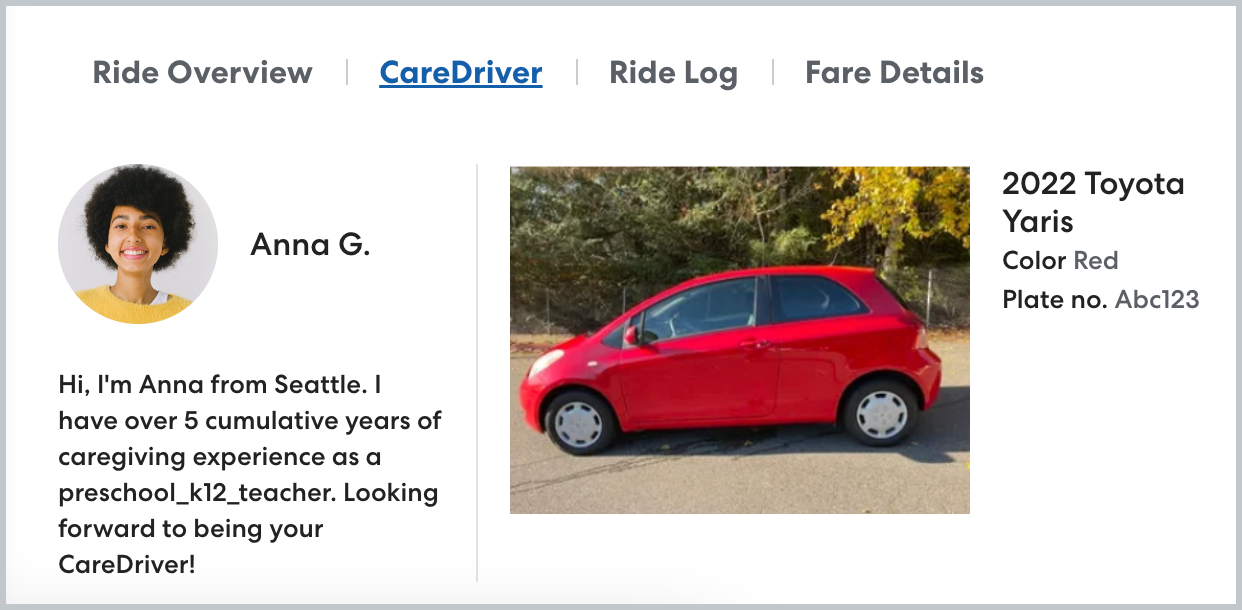
Your private CareDriver profile
The private CareDriver profile contains detailed account information. You can access your CareDriver profile in the CareDriver app. To access your profile, tap Account, then select Account Details.
You can access the following information in your CareDriver Profile:
-
Account Details
In this section, you'll see your basic account information: profile photo, name, phone number, email, and mailing address.
You can update your profile photo, email address, and phone number in the app. If you need to change or update any other information, email driversupport@hopskipdrive.com with the specific information you'd like to change.
-
Documents
Review the documents section to see the expiration dates for all your documents, including Vehicle insurance, Driver's License, Vehicle Registration, and Vehicle inspection. If one of your documents is expiring soon, you'll see a warning here. Learn more about updating expired documents here.
-
Vehicle
This section shows the vehicle linked to your profile. It is important that you only use the vehicle on your profile to perform rides with HopSkipDrive. If you need to change the vehicle on your profile, learn how here. -
Advanced Qualifications
This section lists the Advanced Qualifications you currently have and any additional Advanced Qualifications that are available. Learn more about Advanced Qualifications here.
-
Settings
Use this section to manage your notifications. You can manage:
Notifications:- Urgent Ride Notifications: Get messages when an urgent ride is available in your area.
- Status Reminders: Get reminders to update your ride status when you reach a location.
Navigation:
- Manage in-app navigation, audio, and map display options. Learn more about managing navigation options in this article.
You can also sign out of the app.