
Yes! You can add detailed pickup and drop-off instructions for the CareDriver to follow. This could include:
- Walking inside to sign out your child
- Walking your child to the door when dropping them off
- Any other things you would normally do when picking up or dropping off your child
Be as specific as possible in your instructions to help the CareDriver understand what to do. For example:
Please walk Jaden to the door, ring the bell, and wait for someone to answer before leaving.
or:
Walk inside the school and check in at the front office to sign Marissa out. You will need to show the HopSkipDrive app to identify yourself.
How to add pickup or drop-off instructions:
You can add pickup and drop-off instructions when scheduling a ride. Once you add them, the instructions are saved and will apply to all rides to those locations, but you can edit them at any time.
Follow the steps below to add or edit instructions when scheduling a ride:
- Begin scheduling a ride. Select the date, time, and Rider(s).
- When selecting the pickup or drop-off location, tap the desired location to view the existing notes, then tap the notes to edit. Alternately, you can add a new location.
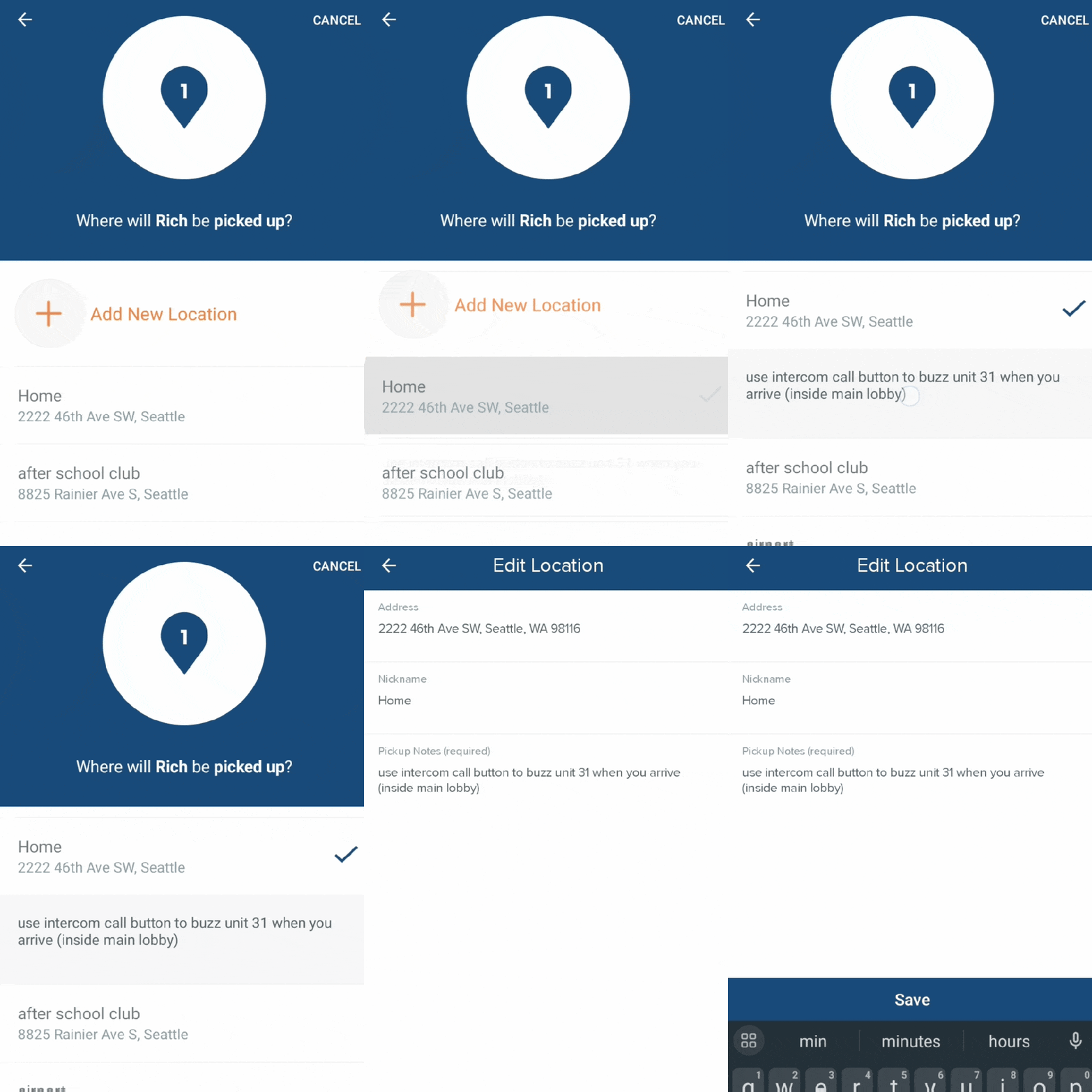
Add the desired information and tap Save.
Learn more:
- How Can I Change the Pickup or Drop-off Location for a Ride?
- How Does my Child Know Who the CareDriver will Be?